


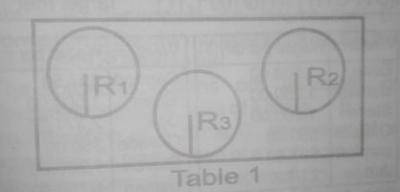
Use Microsoft Word application to reproduce the circles with lines R\(_{1}\), R\(_{2}\) and R\(_{3}\) as shown in Figure 1 and perform the following tasks.
(a) Lines R\(_{1}\), R\(_{2}\) and R\(_{3}\) should be of different length.
(b) Label R\(_{1}\), R\(_{2}\) and R\(_{3}\) should be of different fonts.
(c) You are provided with Table 1. Complete the table.
| R | VALUE OF R |
| R1 | |
| R2 | |
| R3 |
(d) Group the circles in Figure 1.
(e) Insert a text box and type in your full name as the file name
(f) Insert a footer and type in your full name and index number
(g) Save your work in the folder created on the desktop using your full name as the file name.
(h) Print your work and submit to the supervisor.
A supermarket listed ten items on sale.
Use Microsoft Excel application to create an inventory for the supermarket.
(a) Type in the following headings from cell A1 to F1 respectively.
SN, Goods Cost Price, Selling Price, Gain/Loss and Target.
(b) Populate the table by supplying ten different items sold in a supermarket. In column A, fill in the numbers 1 to 10 from cells A2 to A11. Similarly, list the ten items from cells B2 to B11. Supply Cost Price and Selling Price from cell B2 to B11. Supply Cost Price and Selling Price from cells C2 to C11 and D2 to D11 respectively. Note that it is possible to have some selling prices lower than the cost price. Create borders around the table.
(c) Use formula or function to calculate; (i) the gain (if the selling price is higher than the cost price) or the loss (if the cost price is higher than the selling price) of each item from cells E2 to E11
(ii) 110% of the cost price of each item from cells F2 to F11.
(d) Determine whether target is met or not by typing "target met" or "target not met" in cells H2 to H11 for each item.
Note that target is met when the selling price is 110% of the cost price or more otherwise target is not met.
(e) Insert a footer and type in your full name and index number.
(f) Save your work in the folder created on the desktop using your full name as th file name.
(g) Print your work showing formulas and functions and submit to the supervisor.
(a) Using the star shape tool in CorelDraw, draw a 30 pts star of diameter 18 cm and fill it with grey colour.
(b) Use sharpness tool to adjust the corner sharpness of the star by 25 pts.
(c) Place three circles; circle 1, circle 2 and circle 3 with diameters 10 am, 7.6 cm and 5.4 cm respectively inside the star.
(d) Use Text tool to type ARISE AND SHINE and place it in-between circle 2 and 3.
(e) Fill cicle2 with lemon colour and circle 3 with white colour.
(f) Place five stars inside circle 3.
(g) Group your drawing.
(h) Type in your full name as a footer.
(i) Save and print your work.
(j) Submit your printout to the supervisor.

(a) Using a word processor, typeset the following pas sage with 12 point Tahoma font: Elements of Data Processing.
The main purpose of this subject is to provide the required knowledge and business programming skill for you to effectively use data processing system and manage the data processing department of an organization.
Basic concepts of data processing, required computer systems, personnel, tools for developing data processing application and basic programming skills are also covered in this study material. This will be achieved through the following: AIMS Students should be able to:
- Explain data processing concepts, system, personnel and tools;
- Describe data processing techniques;
- Acquire skills for developing, implementing and managing data processing system.
(b) Format the passage as stated below:(i) Heading of the page: apply a 16 point font-size in upper case form; bold, centralize and underline it.
(ii) Body of the passage: change the line spacing to 1.5; align, justify.
(i) Sub-heading of the passage: bold and italicise; use text highlight colour Gray 50%
(iv) Create a bulleted list type of your choice for the text under "Aim" and format as follows: explain the data processing concepts, systems, personnel and tools; acquire skills for developing, implementing and managing data processing system; describe data processing techniques. Change the page orientation to landscape.
(d) Using the header tool, insert your full name and index number.
(e) Save the work as PROCESSING in the folder created and print.
2.(a) using a presentation program, create four blank slides with a suitable design template.
Insert a footer showing your full name and index number with font size 20 points
(b) Prepare each slide as follows.
SLIDE 1:
Type VEGETABLE as the title and format it as follows
SLIDE 2:
(i) Type the sub-title as "Health Advantages of Vegetables and format it as follows: Font type: -Arial Black; size -44
Font type: -Arial, style -bold: size-96; colour blue
(ii) Insert the following content: Vegetables enhance your body wellness. Here are some of the potential health benefits
1. Reduce the risk of heart diseases including heart at tack and stroke.
2. Protect against certain type of cancer.
3. Reduce the risk of developing kidney stones.
SLIDE 3:
(i) Type sub-titles as "STATISTICS"
(ii) Insert the following tables:
|
Vegetable Types |
% Nutrient |
|
Orange vegetable |
15 |
|
Starchy vegetable |
30 |
|
Other vegetable |
35 |
SLIDE 4:
(i) Type sub-title as "Nutrient Chart"
(ii) Create a pie-chart using the tabulated data in SLIDE 3.
(c) Save the work as CHART in the folder ceated and print.
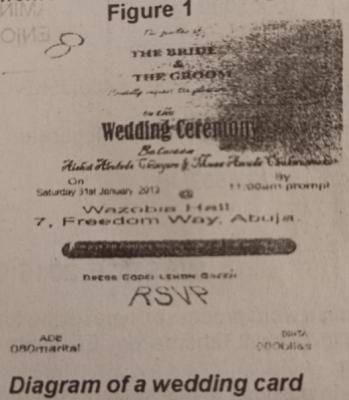
3. Use a graphical application program to design a simple wedding invitation card as given in figure 1 using the listed specifications.
(a) Two wedding rings as logo. Format as shown in figure 1.
(b) THE BRIDE AND THE GROOM
Font style: Dutch 801 x BdBT
Size: 24 pt. The families of Cordially request the Size 24 pt pleasure of
Font style - Free script to the Size 31.351 pt
Wedding ceremony Font style Blernard MT Condensed Size 54.351 pt
Between Font style-Freestyle script Size 35.777 pt
Aishat Abosede Chinyere
Font style - Blackadder ITC & Size-35.647 pt
Musha Amuda Chukwuemeka Venue Font style- Arial Size 23.55 pt
Reception follows immediately Font style- Ar At the same venue RSVP font style- Arial Size 18 pt
Font style- Arial Size 37.787 pt
On Font style Arial Saturday 31st January, 2013 @ Wazobia Hall, 7, Freedom Way Abuja. Font style - Arial Size 24 pt By 11.00 a.m. prompt Size 20.607 pt
(c)Using the footer tool, insert your full name and index number.
(d) Save the work as CARD in the folder created and print.
Using a word processing package, create a college timetable format titled "COLLEGE TIME TABLE" for 7 subjects (English, Maths, Biology, Chemistry, Physics, Civic Education, and Computer Studies), for 5 days with a minimum of 45 minutes duration. Lunchtime is 40 minutes, and lessons in the college have a minimum of 5 periods/week.
(a) Format the "COLLEGE TIME TABLE" using the following:
(i) The title of the table should be aligned center, bold, and underlined;
(ii) Use table design style of any type
(iii) Days of the week should be bold
(b) Save your work with your full name in the folder created.
(c) print and submit your work

