Post UTME Past Questions Agent
Your School's Whatsapp Group - Join Us now

UI announces virtual orientation programme for 2020/2021 freshers

This is to inform all newly admitted students of University of Ibadan that the management has released the procedures for getting the orientation resources and Lecture resources as well

WAEC and NECO CBT App for Mobile Devices - Candidates, Schools, Centres, Resellers - 100% Offline -Download Now
Post-UTME Past Questions - Original materials are available here - Download PDF for your school of choice + 1 year SMS alerts
Your School's Whatsapp Group - Join Us now

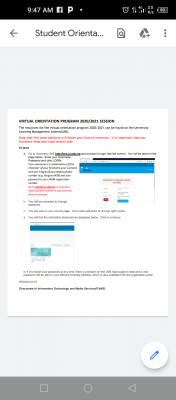
The resources for the virtual orientation program 2020/2021 can be found on the University 
Learning Management System(LMS). 
UI announces virtual orientation programme for 2020/2021 freshers

Note that this same platform will house your lecture resources. It is important that you therefore keep your login details safe.

To start
a. Go to University LMS http://lms.ui.edu.ng and proceed to login (top left corner). You will be taken to the page

Post UTME Past Questions Agent
Your School's Whatsapp Group - Join Us now
Post-UTME Past Questions - Original materials are available here - Download PDF for your school of choice + 1 year SMS alerts

Enter your Username, Password and click LOGIN:
Your username is a combination of first character of your first name, your surname  and last 3 digits of your Matriculation number (e.g. rbogunro456) and your password is your JAMB registration number. Go to portal.ui.edu.ng to view your Matriculation number if you have not done so already


b. You will be prompted to change
password 


c. You are now on your course page. Your name will show on the top right corner. 


d. You will find the orientation resources as displayed below. Click to continue


e. If you forget your password at any time, there is provision on the LMS main page to reset and a new 
password will be sent to your official University address, which is also available from the registration portal. 
 

Related Posts

Your School's Whatsapp Group - Join Us now
Post-UTME Past Questions - Original materials are available here - Download PDF for your school of choice + 1 year SMS alerts
Post UTME Past Questions Agent

Comments ({{ comment_count }})

Please wait...

{{ settings.no_comment_msg ? settings.no_comment_msg : 'There are no comments' }}

Quick Questions

Ask Your Own Question
To get notifications when anyone comments,
Follow Comments

Post Comment

Please don't post or ask to join a "Group" or "Whatsapp Group" as a comment. It will be deleted. To join or start a group, please click here

{{ quote.posted_by.display_name }}
{{ settings.form_textarea_description }}
 
Post UTME Past Questions Agent
WAEC and NECO CBT Software for Computers and Laptops - Candidates, Schools, Centres, Resellers - 100% Offline -Download Now
WAEC and NECO CBT App for Mobile Devices - Candidates, Schools, Centres, Resellers - 100% Offline -Download Now
Post-UTME Past Questions - Original materials are available here - Download PDF for your school of choice + 1 year SMS alerts
Your School's Whatsapp Group - Join Us now
Marketplace
WAEC and NECO CBT Software for Computers and Laptops - Candidates, Schools, Centres, Resellers - 100% Offline -Download Now
WAEC and NECO CBT App for Mobile Devices - Candidates, Schools, Centres, Resellers - 100% Offline -Download Now
Post-UTME Past Questions - Original materials are available here - Download PDF for your school of choice + 1 year SMS alerts
Post UTME Past Questions Agent