WAEC and NECO CBT Software for Computers and Laptops - Candidates, Schools, Centres, Resellers - 100% Offline -Download Now
WAEC and NECO CBT App for Mobile Devices - Candidates, Schools, Centres, Resellers - 100% Offline -Download Now

IAUE Batch D admission list for 2020/2021 session

Ignatius Ajuru University's Batch D admission list for the 2020/2021 academic session is out. Candidates can check if their names are on the admission list. The names of admitted candidates are contained on the attached Pdf document below;

Post-UTME Past Questions - Original materials are available here - Download PDF for your school of choice + 1 year SMS alerts
Post UTME Past Questions Agent
Your School's Whatsapp Group - Join Us now

Consequently, all successful candidates whose names appeared in the supplementary list below should visit the university website for the Clearance Procedure and Requirements. Or follow the link here-
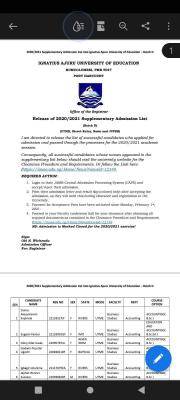
IAUE Batch D admission list for 2020/2021 session

(https://iauoe.edu.ng/Home/News?newsid=12149).

REQUIRED ACTION: 
1. Login to their JAMB Central Admission Processing System (CAPS) and 
accept/reject their admission.
2. Print their admission letter and result slip (colored only) after accepting the 
admission, as they will need this during clearance and registration in the 
University.
3. Payment for Acceptance Fees have been activated since Monday, February 1st, 
2021. 
4. Proceed to your Faculty conference hall for your clearance after obtaining all 
required documents as contained in the Clearance Procedure and Requirements 
(https://iauoe.edu.ng/Home/News?newsid=12149 

Your School's Whatsapp Group - Join Us now
Post UTME Past Questions Agent
Post-UTME Past Questions - Original materials are available here - Download PDF for your school of choice + 1 year SMS alerts

NB: Admission is Marked Closed for the 2020/2021 exercise!

Download File
FIND FILE ATTACHED BELOW:
Download File

Related Posts

WAEC and NECO CBT Software for Computers and Laptops - Candidates, Schools, Centres, Resellers - 100% Offline -Download Now
Post UTME Past Questions Agent
WAEC and NECO CBT App for Mobile Devices - Candidates, Schools, Centres, Resellers - 100% Offline -Download Now

Comments ({{ comment_count }})

Please wait...

{{ settings.no_comment_msg ? settings.no_comment_msg : 'There are no comments' }}

Quick Questions

Ask Your Own Question
To get notifications when anyone comments,
Follow Comments

Post Comment

Please don't post or ask to join a "Group" or "Whatsapp Group" as a comment. It will be deleted. To join or start a group, please click here

{{ quote.posted_by.display_name }}
{{ settings.form_textarea_description }}
 
Post UTME Past Questions Agent
Your School's Whatsapp Group - Join Us now
Post-UTME Past Questions - Original materials are available here - Download PDF for your school of choice + 1 year SMS alerts
WAEC and NECO CBT Software for Computers and Laptops - Candidates, Schools, Centres, Resellers - 100% Offline -Download Now
WAEC and NECO CBT App for Mobile Devices - Candidates, Schools, Centres, Resellers - 100% Offline -Download Now
Marketplace
WAEC and NECO CBT Software for Computers and Laptops - Candidates, Schools, Centres, Resellers - 100% Offline -Download Now
Post UTME Past Questions Agent
Your School's Whatsapp Group - Join Us now
Post-UTME Past Questions - Original materials are available here - Download PDF for your school of choice + 1 year SMS alerts