WAEC and NECO CBT App for Mobile Devices - Candidates, Schools, Centres, Resellers - 100% Offline -Download Now
Post-UTME Past Questions - Original materials are available here - Download PDF for your school of choice + 1 year SMS alerts

IAUE Post-UTME/DE 2026: Cut-off mark, Eligibility and Registration Details

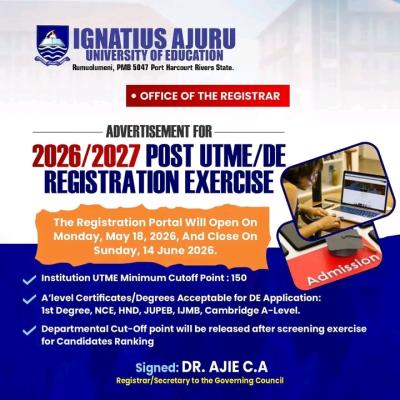
This is to invite all UTME and Direct Entry (DE) candidates of Ignatius Ajuru University of Education for the 2026/2027 admission exercise. Candidates who sat for the Unified Tertiary Matriculation Examination and scored 150 and above including those that did not choose the institution and are willing to seek admission with Ignatius Ajuru University of Education, and Direct Entry Candidates to commence registration using the registration link on the portal as contained in the advertisement. The registration portal will open on Monday, 18th May, 2026 and close on Sunday, 14th June, 2026.The registration fee is N2,000.00 only.

WAEC and NECO CBT App for Mobile Devices - Candidates, Schools, Centres, Resellers - 100% Offline -Download Now
Your School's Whatsapp Group - Join Us now
Post UTME Past Questions Agent

We have created IAUE WhatsApp group for aspirants and prospective students of Ignatius Ajuru University of Education (IAUE). The idea is to help candidates stay updated regarding Post-UTME and Admission activities for the 2026/2027 academic session in IAUE. Join now! See instructions by clicking here.

IAUE Post-UTME/DE 2026: Cut-off mark, Eligibility and Registration Details

AVAILABLE PROGRAMMES 

Check the attached PDF document below for a list of all the available courses.

WAEC and NECO CBT App for Mobile Devices - Candidates, Schools, Centres, Resellers - 100% Offline -Download Now
Your School's Whatsapp Group - Join Us now
Post-UTME Past Questions - Original materials are available here - Download PDF for your school of choice + 1 year SMS alerts

Procedure for Online Registration:

1. Visit the University Website http://www.iaue.edu.ng

2. On ADMISSION Menu, click on “Undergraduate Studies”

3. Click on “2026/2027 UTME/DE Screening Registration Portal.

4. On the page that appears, click on “Register for 2026/2027 Session UTME/DE Screening”

5. A page appears; enter your JAMB Reg. No. and Click Register.

6. If you are a FIRST-CHOICE candidate:

Your details will appear.

Click on Confirm to confirm your details.

Enter your Phone No. and Email & click on submit.

An Email containing your login details will be sent to you via your registered email address. Please ensure you use a valid e-mail address during registration.

If you have forgotten your password or unable to note it from the registration screen, kindly login to your email address for your login details.

7. Candidates who Changed Institution to IAUE should do the following:

Click on UTME Registration button, a form will appear.

 Fill in the form completely and click on submit.

 An E-mail containing your login details will be sent to you via your registered email address. Please ensure you use a valid email address during registration.

 If you have forgotten your password or unable to note it from the registration screen, kindly login to your email address for your login details.

NB: Candidates who use awaiting results during JAMB registration should remember to upload their O’level on JAMB portal and do the same on the University portal.

8. Click on Login and enter your username and password sent to your email/phone.

9. You will be prompted to change your password. Save your new password.

10. From the menu on the left, click on Pay Screening Fees.

11. Click on Pay for UTME Registration button and then click on Generate invoice below.

12. Confirm your invoice and click on Proceed to Pay

13. You will be redirected to Paystack payment platform, enter your card details and make your payment conveniently. For security purposes, your card details are NOT stored in our secured portal.

14. After successful payment, click on ‘Update Personal Data’ menu on the left, UPDATE ALL FIELDS on your registration form and submit.

15. Print your Registration Slip and log out.

16. Save your login details. Your username and your password are your personal credentials to access your profile in the University portal.

NB: Please, ensure error-free and seamless registration. The University is engaging in data verification of its candidates. We will do a data match with the information provided by JAMB through its database.

Please note that registration is online, and candidates are advised to register from any location.

THE SCREENING EXERCISE

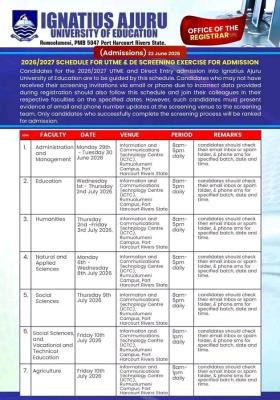
The 2026/2027 Screening Exercise will be in Hybrid Mode. Candidates will be invited to the University main campus, Rumuolumeni for O’level/A’level certificate verification, Data Screening, Ranking and Compulsory Biometric validation Exercise. Further details and modalities (date and venue) of the screening will be announced in due course.

PLEASE NOTE:

Admission is free. Candidates should report any demand for money for admission to the appropriate authorities. Parents, guardians, well-wishers and other unauthorized persons are not allowed at the screening Centre during the screening exercise. For other enquiries, online registration support and guide, please call GSM numbers: Technical Support: 08132205677, 08098344373 & 07061629902 Complaints: 08037049620, 08187589220.

Email: support.admissions@iaue.edu.ng

Signed:

DR. Chinonye A. Ajie. 

Registrar.

Download File
FIND FILE ATTACHED BELOW:
Download File

Related Posts

Post UTME Past Questions Agent
WAEC and NECO CBT App for Mobile Devices - Candidates, Schools, Centres, Resellers - 100% Offline -Download Now
Your School's Whatsapp Group - Join Us now

Comments ({{ comment_count }})

Please wait...

{{ settings.no_comment_msg ? settings.no_comment_msg : 'There are no comments' }}

Quick Questions

Ask Your Own Question
To get notifications when anyone comments,
Follow Comments

Post Comment

Please don't post or ask to join a "Group" or "Whatsapp Group" as a comment. It will be deleted. To join or start a group, please click here

{{ quote.posted_by.display_name }}
{{ settings.form_textarea_description }}
 
WAEC and NECO CBT App for Mobile Devices - Candidates, Schools, Centres, Resellers - 100% Offline -Download Now
Post-UTME Past Questions - Original materials are available here - Download PDF for your school of choice + 1 year SMS alerts
Your School's Whatsapp Group - Join Us now
Post UTME Past Questions Agent
WAEC and NECO CBT Software for Computers and Laptops - Candidates, Schools, Centres, Resellers - 100% Offline -Download Now
Marketplace
WAEC and NECO CBT Software for Computers and Laptops - Candidates, Schools, Centres, Resellers - 100% Offline -Download Now
Your School's Whatsapp Group - Join Us now
Post UTME Past Questions Agent
Post-UTME Past Questions - Original materials are available here - Download PDF for your school of choice + 1 year SMS alerts