This is to inform all prospective students of Cross Rivers State University that the management of the university has announced a mop-up admission screening for the 2020/2021 academic session. This information is for prospective candidates (both UTME and Direct Entry) who


(1) Selected CRUTECH as their First Choice institution but missed the First Screening
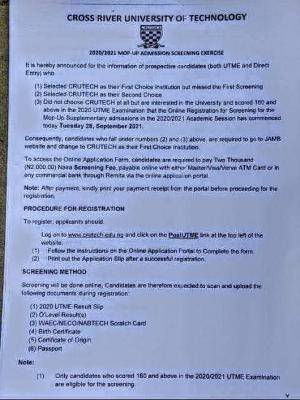
(2) Selected CRUTECH as their Second Choice
(3) Did not choose CRUTECH at all but are interested in the University and scored 180 and above in the 2020 UTME Examination that the Online Registration for Screening for the Mop-Up Supplementary admissions in 2020/2021 Academic Session has commenced today Tuesday 26, September 2021.
Consequently, candidates who fall under numbers (2) and (3) above, are required to go to JAMB website and change to CRUTECH as their First Choice institution
To access the Online Application Form, candidates are required to pay Two Thousand (N2,000.00) Nava Screening Fee, payable online with either Master/Visa/Verve ATM Card or in any commercial bank through Remita via the online application portal
Note: After payment, kindly print your payment receipt from the portal before proceeding for the registration.
To register, applicants should
Log on to www.crutech.edu.ng and click on the PostUTME link at the top left of the website,
(1) Follow the instructions on the Online Application Portal to Complete the form
(2) Print out the Application Slip after a successful registration,
SCREENING METHOD
Screening will be done online, Candidates are therefore expected to scan and upload the following documents during registration
(1) 2020 UTME Result Slip
(2) O'Level Result(s)
(3) WAEC NECO/NABTEB Scratch Card
(4) Birth Certificates
(5) Certificate of Origin
(6) Passport
Note:
(1) Only candidates who scored 160 and above in the 2020/2021 UTME Examination are eligible for the screening
(2) Candidates are not required to appear physically for the screening and therefore not expected to travel to Calabar.
Candidates should therefore ensure that
The O'Level Results and Phone Number details are entered properly
The courses available for supplementary admission are
Physics
Mathematics
Statistics
Chemistry
Business Education
Education Physics
Education Biology
EducationChemistry
Education Mathematics
Educational Administration & Planning
Educational Foundations & Administration
Guidance & Counselling
Human Kinetic and Health Education
Technical Education
Accountancy
Hospitality & Tourism Management
Marketing
Human Anatomy
Physiology
Agronomy
Agric Econs & Extension
Animal Science
Forestry & Wildlife Resource Management
Fisheries
Estate Management
Urban & Regional Planning
Visual Arts & Technology
Mechanical Engineering
Wood Products Engineering
Animal Health and Environmental Biology
Plant Science and Biotechnology
Library and Information Science






Comments ({{ comment_count }})
Please wait...
Modal title
Report
Block User
{{ feedback_modal_data.title }}