how can I upload my receipt and my order code?
T23c4h5i
10 Feb, 2025
To get notifications when anyone posts a new answer to this question
Answers (2)
Post your comment

HOW TO UPLOAD MY PAYMENT RECEIPT ON MYSCHOOL APP.
1. Click on the cart ( ) icon at the home page.
2. Click on “Proceed.”
3. Select the payment method you used when making payment and then click on “Complete Checkout.”
4. Tick the “I have read the instructions and I fully understand the process of payment” box.
5. Click the "Get Account Information" icon that is underneath the ticked box.
6. Click on “Confirm Payment.”
Then a page which contains where you can upload the screenshot will be brought to you. Remember to let your payment receipt includes your order code, myschool bank account where the payment was made, date, and the name on the sender's account. Best of Luck.

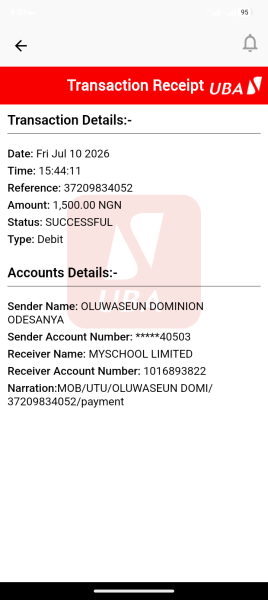
I have made payments since on Friday for nacon post utme I have not be rectify now today is Friday and I need it urgently
Quick Questions

Efetimi
20 Aug, 2025
How can one go about Delsu Post Jamb registration? Since there's no post Utme based on this publication; will there be any form of online registration?
justinazuka
14 Dec, 2021