WAEC and NECO CBT App for Mobile Devices - Candidates, Schools, Centres, Resellers - 100% Offline -Download Now
Post UTME Past Questions Agent

Zamfara State University registration procedure for newly admitted students, 2020/2021

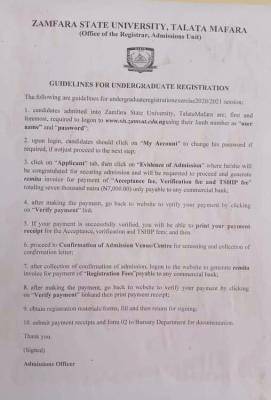
This is to inform the newly undergraduate admitted students of the Zamfara State University Talata that the university management has released the registration guidelines for the 2020/2021 academic session:

Post-UTME Past Questions - Original materials are available here - Download PDF for your school of choice + 1 year SMS alerts
Post UTME Past Questions Agent
Your School's Whatsapp Group - Join Us now

1. candidates admitted into Zamfara State University, Talata Mafara are: first and foremost. required to logon to http://www.sis.zamsut.edu.ng/ using their Jamb registration number as "username" and "password
Zamfara State University registration procedure for newly admitted students, 2020/2021

2. upon login, candidates should click on "My Account" to change their password if required, if not just proceed to the next step:

3 click on "Applicant" tab, then click on "Evidence of Admission" where he/she will be congratulated for securing admission and will be requested to proceed and generate remita invoice for payment of Acceptance fee, Verification fee and TSHIP fee"totaling seven thousand naira (N7.000.00) only payable to any commercial bank:

WAEC and NECO CBT App for Mobile Devices - Candidates, Schools, Centres, Resellers - 100% Offline -Download Now
Post-UTME Past Questions - Original materials are available here - Download PDF for your school of choice + 1 year SMS alerts
Your School's Whatsapp Group - Join Us now

4. after making the payment, go back to website to verify your payment by clicking on "Verify payment" link

5. If your payment is successfully verified. you will be able to print your payment receipt for the Acceptance, verification and TSHIP fes; and then

6. proceed to Confirmation of Admission Venue/Centre for screening and collection of confirmation letter:

7. after collection of confirmation of admission, logon to the website to generate remita invoice for payment of"Registration Fees payable to any commercial bank:

8. after making the payment, go back to website to verify your payment by clicking on Verify payment" link and then print payment receipt:

9. obtain registration materials form, fill and then return for signing:

10. submit payment receipts and form 02 to Bursary Department for documentation

Thank you

(Signed)

Admissions Officer

Related Posts

Post-UTME Past Questions - Original materials are available here - Download PDF for your school of choice + 1 year SMS alerts
WAEC and NECO CBT Software for Computers and Laptops - Candidates, Schools, Centres, Resellers - 100% Offline -Download Now
Your School's Whatsapp Group - Join Us now

Comments ({{ comment_count }})

Please wait...

{{ settings.no_comment_msg ? settings.no_comment_msg : 'There are no comments' }}

Quick Questions

Ask Your Own Question
To get notifications when anyone comments,
Follow Comments

Post Comment

Please don't post or ask to join a "Group" or "Whatsapp Group" as a comment. It will be deleted. To join or start a group, please click here

{{ quote.posted_by.display_name }}
{{ settings.form_textarea_description }}
 
WAEC and NECO CBT App for Mobile Devices - Candidates, Schools, Centres, Resellers - 100% Offline -Download Now
WAEC and NECO CBT Software for Computers and Laptops - Candidates, Schools, Centres, Resellers - 100% Offline -Download Now
Your School's Whatsapp Group - Join Us now
Post UTME Past Questions Agent
Post-UTME Past Questions - Original materials are available here - Download PDF for your school of choice + 1 year SMS alerts
Post UTME Past Questions Agent
WAEC and NECO CBT App for Mobile Devices - Candidates, Schools, Centres, Resellers - 100% Offline -Download Now
WAEC and NECO CBT Software for Computers and Laptops - Candidates, Schools, Centres, Resellers - 100% Offline -Download Now
Your School's Whatsapp Group - Join Us now