Your School's Whatsapp Group - Join Us now
Post UTME Past Questions Agent

UNIZIK announces supplementary admission for candidates yet to upload their results

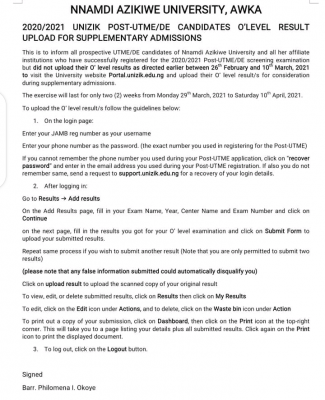
This is to inform all prospective UTME/DE candidates of Nnamdi Azikiwe University and all her affiliate institutions who have successfully registered for the 2020/2021 Post-UTME/DE screening examination but did not upload their O' level results as directed earlier between 26th February and 10 March, 2021 to visit the University website portal.unizik.edu.ng and upload their O' level result/s for consideration during supplementary admissions.

Your School's Whatsapp Group - Join Us now
Post-UTME Past Questions - Original materials are available here - Download PDF for your school of choice + 1 year SMS alerts
WAEC and NECO CBT App for Mobile Devices - Candidates, Schools, Centres, Resellers - 100% Offline -Download Now

The exercise will last for only two (2) weeks from Monday 29" March, 2021 to Saturday 10" April, 2021.

UNIZIK announces supplementary admission for candidates yet to upload their results

To upload the O' level result/s follow the guidelines below:

1. On the login page:

WAEC and NECO CBT App for Mobile Devices - Candidates, Schools, Centres, Resellers - 100% Offline -Download Now
WAEC and NECO CBT Software for Computers and Laptops - Candidates, Schools, Centres, Resellers - 100% Offline -Download Now
Post-UTME Past Questions - Original materials are available here - Download PDF for your school of choice + 1 year SMS alerts
  • Enter your JAMB reg number as your username
  • Enter your phone number as the password. (the exact number you used in registering for the Post-UTME)
  • If you cannot remember the phone number you used during your Post-UTME application, click on "recover password" and enter in the email address you used during your Post-UTME registration. If also you do not
  • remember same, send a request to support.unizik.edu.ng for recovery of your login details.

2. After logging in:

  • Go to Results → Add results
  • On the Add Results page, fill in your Exam Name, Year, Center Name and Exam Number and click on Continue
  • on the next page, fill in the results you got for your O' level examination and click on Submit Form to upload your submitted results.
  • Repeat same process if you wish to submit another result (Note that you are only permitted to submit two results)
  • (please note that any false information submitted could automatically disqualify you)
  • Click on upload result to upload the scanned copy of your original result
  • To view, edit, or delete submitted results, click on Results then click on My Results
  • To edit, click on the Edit icon under Actions, and to delete, click on the Waste bin icon under Action
  • To print out a copy of your submission, click on Dashboard, then click on the Print icon at the top-right corner. This will take you to a page listing your details plus all submitted results. Click again on the Print icon to print the displayed document.

3. To log out, click on the Logout button.

Signed

Barr. Philomena lI. Okoye


Related Posts

WAEC and NECO CBT App for Mobile Devices - Candidates, Schools, Centres, Resellers - 100% Offline -Download Now
Post-UTME Past Questions - Original materials are available here - Download PDF for your school of choice + 1 year SMS alerts
Your School's Whatsapp Group - Join Us now

Comments ({{ comment_count }})

Please wait...

{{ settings.no_comment_msg ? settings.no_comment_msg : 'There are no comments' }}

Quick Questions

Ask Your Own Question
To get notifications when anyone comments,
Follow Comments

Post Comment

Please don't post or ask to join a "Group" or "Whatsapp Group" as a comment. It will be deleted. To join or start a group, please click here

{{ quote.posted_by.display_name }}
{{ settings.form_textarea_description }}
 
WAEC and NECO CBT App for Mobile Devices - Candidates, Schools, Centres, Resellers - 100% Offline -Download Now
WAEC and NECO CBT Software for Computers and Laptops - Candidates, Schools, Centres, Resellers - 100% Offline -Download Now
Your School's Whatsapp Group - Join Us now
Post UTME Past Questions Agent
Post-UTME Past Questions - Original materials are available here - Download PDF for your school of choice + 1 year SMS alerts
Marketplace
Post-UTME Past Questions - Original materials are available here - Download PDF for your school of choice + 1 year SMS alerts
WAEC and NECO CBT Software for Computers and Laptops - Candidates, Schools, Centres, Resellers - 100% Offline -Download Now
WAEC and NECO CBT App for Mobile Devices - Candidates, Schools, Centres, Resellers - 100% Offline -Download Now
Post UTME Past Questions Agent