Post-UTME Past Questions - Original materials are available here - Download PDF for your school of choice + 1 year SMS alerts
Your School's Whatsapp Group - Join Us now

UNIUYO Post-UTME 2026: Cut off mark, Eligibility and Registration Procedures

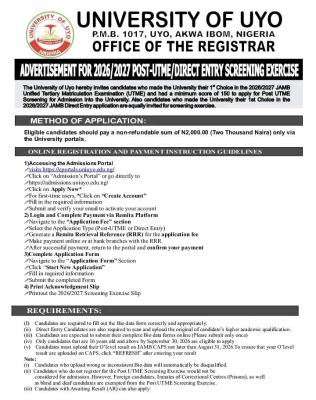
The University of Uyo hereby invites candidates who made the University their 1st Choice in the 2026/2027 JAMB Unified Tertiary Matriculation Examination (UTME) and had a minimum score of 150 to apply for Post UTME Screening for Admission into the University. Also candidates who made the University their 1st Choice in the 2026/2027 JAMB Direct Entry application are equally invited for screening exercise.

Your School's Whatsapp Group - Join Us now
Post-UTME Past Questions - Original materials are available here - Download PDF for your school of choice + 1 year SMS alerts
WAEC and NECO CBT Software for Computers and Laptops - Candidates, Schools, Centres, Resellers - 100% Offline -Download Now

We have created UNIUYO WhatsApp group for aspirants and prospective students of University of Uyo (UNIUYO). The idea is to help candidates stay updated regarding Post-UTME and Admission activities for the 2026/2027 academic session in UNIUYO. Join now! See instructions by clicking here.

UNIUYO Post-UTME 2026: Cut off mark, Eligibility and Registration Procedures

METHOD OF APPLICATION:

Eligible candidates should pay a non-refundable sum of N2,000.00 (Two Thousand Naira) only via the University portals.

Post UTME Past Questions Agent
Post-UTME Past Questions - Original materials are available here - Download PDF for your school of choice + 1 year SMS alerts
WAEC and NECO CBT Software for Computers and Laptops - Candidates, Schools, Centres, Resellers - 100% Offline -Download Now

ONLINE REGISTRATION AND PAYMENT INSTRUCTION GUIDELINES

1) Accessing the Admissions Portal visits https://eportals.uniuyo.edu.ng

Click on "Admission's Portal" or go directly to https://admissions.uniuyo.edu.ng

Click on Apply Now

For first-time users, "Click on "Create Account"

Fill in the required information

Submit and verify your email to activate your account

2) Login and Complete Payment via Remita Platform

Navigate to the "Application Fee" section

Select the Application Type (Post-UTME or Direct Entry)

Generate a Remita Retrieval Reference (RRR) for the application fee

Make payment online or at bank branches with the RRR

After successful payment, return to the portal and confirm your payment

3)Complete Application Form

Navigate to the "Application Form" Section

Click "Start New Application"

Fill in required information

Submit the completed Form

4) Print Acknowledgment Slip

Printout the 2026/2027 Screening Exercise Slip

REQUIREMENTS:

(i) Candidates are required to fill out the Bio data form correctly and appropriately

(ii) Direct Entry Candidates are also required to scan and upload the original of candidate's higher academic qualification.

(iii) Candidates are expected to submit their complete Bio data forms online (Please submit only once)

(iv) Only candidates that are 16 years old and above by September 30, 2026 are eligible to apply

(v) Candidates must upload their O'level result on JAMB CAPS not later than August 31, 2026. To ensure that your O'level result are uploaded on CAPS, click "REFRESH" after entering your result

Note:

Candidates who upload wrong or inconsistent Bio data will automatically be disqualified.

 Candidates who do not register for the Post UTME Screening Exercise would not be considered for admission. However, Foreign candidates, Inmates of Correctional Centres (Prisons), as well.as blind and deaf candidates are exempted from the Post UTME Screening Exercise.

Candidates with Awaiting Result (AR) can also apply.

Closing Date for Registration: Friday, August 7, 2026.

For more information visit our website: http://uniuyo.edu.ng

Related Posts

Your School's Whatsapp Group - Join Us now
Post UTME Past Questions Agent
WAEC and NECO CBT App for Mobile Devices - Candidates, Schools, Centres, Resellers - 100% Offline -Download Now

Comments ({{ comment_count }})

Please wait...

{{ settings.no_comment_msg ? settings.no_comment_msg : 'There are no comments' }}

Quick Questions

Ask Your Own Question
To get notifications when anyone comments,
Follow Comments

Post Comment

Please don't post or ask to join a "Group" or "Whatsapp Group" as a comment. It will be deleted. To join or start a group, please click here

{{ quote.posted_by.display_name }}
{{ settings.form_textarea_description }}
 
Post-UTME Past Questions - Original materials are available here - Download PDF for your school of choice + 1 year SMS alerts
WAEC and NECO CBT Software for Computers and Laptops - Candidates, Schools, Centres, Resellers - 100% Offline -Download Now
Post UTME Past Questions Agent
Your School's Whatsapp Group - Join Us now
WAEC and NECO CBT App for Mobile Devices - Candidates, Schools, Centres, Resellers - 100% Offline -Download Now
Marketplace
WAEC and NECO CBT App for Mobile Devices - Candidates, Schools, Centres, Resellers - 100% Offline -Download Now
WAEC and NECO CBT Software for Computers and Laptops - Candidates, Schools, Centres, Resellers - 100% Offline -Download Now
Your School's Whatsapp Group - Join Us now
Post-UTME Past Questions - Original materials are available here - Download PDF for your school of choice + 1 year SMS alerts