Post-UTME Past Questions - Original materials are available here - Download PDF for your school of choice + 1 year SMS alerts
WAEC and NECO CBT Software for Computers and Laptops - Candidates, Schools, Centres, Resellers - 100% Offline -Download Now

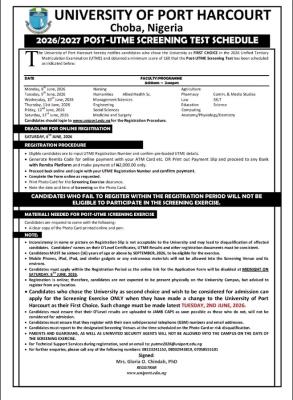
UNIPORT Post-UTME screening schedule, 2026/2027

The University of Port Harcourt hereby notifies candidates who chose the University as FIRST CHOICE in the 2026 Unified Tertiary Matriculation Examination (UTME) and obtained a minimum score of 160 that the Post-UTME Screening Test has been scheduled as indicated below:

WAEC and NECO CBT App for Mobile Devices - Candidates, Schools, Centres, Resellers - 100% Offline -Download Now
WAEC and NECO CBT Software for Computers and Laptops - Candidates, Schools, Centres, Resellers - 100% Offline -Download Now
Your School's Whatsapp Group - Join Us now
Monday, 8th June, 2026 Nursing Agriculture  
Tuesday, 9th June, 2026 Humanities                Allied Health Sc. Pharmacy Comm. & Media Studies
Wednesday, 10th June, 2026 Management Sciences Law SSLT
Thursday, 11st June, 2026 Engineering Education Science
Friday, 12nd June, 2026 Social Sciences Computing  
Saturday, 13rd June, 2026 Medicine and Surgery Anatomy/Physiology/Dentistry  

Candidates are advised to get the official UNIPORT University Post-UTME Past Questions and Answers. This will enable them prepare adequately for the screening. CLICK HERE to get yours.

UNIPORT Post-UTME screening schedule, 2026/2027

Candidates should login to utmedetails.uniport.edu.ng for the Registration Procedure.

DEADLINE FOR ONLINE REGISTRATION

WAEC and NECO CBT App for Mobile Devices - Candidates, Schools, Centres, Resellers - 100% Offline -Download Now
WAEC and NECO CBT Software for Computers and Laptops - Candidates, Schools, Centres, Resellers - 100% Offline -Download Now
Post UTME Past Questions Agent

SATURDAY, 6TH JUNE, 2026

REGISTRATION PROCEDURE

  • Eligible candidates are to input UTME Registration Number and confirm pre-loaded UTME details.
  • Generate Remita Code for online payment with your ATM Card etc. OR Print out Payment Slip and proceed to any Bank with Remita Platform and make payment of N2,000.00 only.
  • Proceed back online and Login with your UTME Registration Number and confirm payment.
  • Complete the Form online as requested.
  • Print Photo Card for the Screening Exercise clearance.
  • Note the date and time of Screening on the Photo Card.
CANDIDATES WHO FAIL TO REGISTER WITHIN THE REGISTRATION PERIOD WILL NOT BE ELIGIBLE TO PARTICIPATE IN THE SCREENING EXERCISE.

MATERIALS NEEDED FOR POST-UTME SCREENING EXERCISE

Candidates are required to come with the following:
• A clear copy of the Photo Card printed online and pen.

NOTE:

  • Inconsistency in name or picture on Registration Slip is not acceptable to the University and may lead to disqualification of affected candidates. Candidates’ names on their O’Level Certificates, UTME Results and other registration documents must be consistent.
  • Candidates MUST be sixteen (16) years of age or above by SEPTEMBER, 2026, to be eligible for the exercise.
  • Mobile Phones, iPad, iPod, and similar gadgets or any extraneous materials will not be allowed into the Screening Venue and its environs.
  • Candidates must apply within the Registration Period as the online link for the Application Form will be disabled at MIDNIGHT ON SATURDAY, 6TH JUNE, 2026.
  • Registration is online; therefore, candidates are not expected to be present physically on the University Campus, but advised to register from any location.
  • Candidates who chose the University as second choice and wish to be considered for admission can apply for the Screening Exercise ONLY when they have made a change to the University of Port Harcourt as their First Choice. Such change must be made latest TUESDAY, 2ND JUNE, 2026.
  • Candidates must ensure that their O’Level results are uploaded to JAMB CAPS as soon possible as those who do not, will not be considered for admission.
  • Candidates must ensure that they register with their own valid personal telephone (GSM) numbers and email addresses.
  • Candidates must report to the designated Screening Venues at the time scheduled on the Photo Card or risk disqualification.
  • PARENTS AND GUARDIANS, AS WELL AS UNINVITED SECURITY AGENTS WILL NOT BE ALLOWED INTO THE CAMPUS ON THE DAYS OF THE SCREENING EXERCISE.
  • For Technical Support Services during registration, send an email toputme2026@uniport.edu.ng
  • For further enquiries, please call any of the following numbers: 08123241152, 08032943819, 07058555101

Signed:
Mrs. Gloria O. Chindah, PhD
REGISTRAR
www.uniport.edu.ng

Related Posts

WAEC and NECO CBT App for Mobile Devices - Candidates, Schools, Centres, Resellers - 100% Offline -Download Now
Post UTME Past Questions Agent
WAEC and NECO CBT Software for Computers and Laptops - Candidates, Schools, Centres, Resellers - 100% Offline -Download Now

Comments ({{ comment_count }})

Please wait...

{{ settings.no_comment_msg ? settings.no_comment_msg : 'There are no comments' }}

Quick Questions

Ask Your Own Question
To get notifications when anyone comments,
Follow Comments

Post Comment

Please don't post or ask to join a "Group" or "Whatsapp Group" as a comment. It will be deleted. To join or start a group, please click here

{{ quote.posted_by.display_name }}
{{ settings.form_textarea_description }}
 
Post-UTME Past Questions - Original materials are available here - Download PDF for your school of choice + 1 year SMS alerts
WAEC and NECO CBT App for Mobile Devices - Candidates, Schools, Centres, Resellers - 100% Offline -Download Now
WAEC and NECO CBT Software for Computers and Laptops - Candidates, Schools, Centres, Resellers - 100% Offline -Download Now
Post UTME Past Questions Agent
Your School's Whatsapp Group - Join Us now
Marketplace
Your School's Whatsapp Group - Join Us now
Post-UTME Past Questions - Original materials are available here - Download PDF for your school of choice + 1 year SMS alerts
WAEC and NECO CBT Software for Computers and Laptops - Candidates, Schools, Centres, Resellers - 100% Offline -Download Now
Post UTME Past Questions Agent