Post UTME Past Questions Agent
WAEC and NECO CBT Software for Computers and Laptops - Candidates, Schools, Centres, Resellers - 100% Offline -Download Now

UNIMAID Admission Screening Registration 2016/2017 Announced

This is to inform aspirants of University of Maiduguri for the 2016/2017 academic session that the admission screening registration has commenced.

WAEC and NECO CBT App for Mobile Devices - Candidates, Schools, Centres, Resellers - 100% Offline -Download Now
WAEC and NECO CBT Software for Computers and Laptops - Candidates, Schools, Centres, Resellers - 100% Offline -Download Now
Post UTME Past Questions Agent

Eligibility
Candidates who chose University of Maiduguri and scored the minimum cut off mark in the 2016 UTME registration.
UNIMAID Admission Screening Registration 2016/2017 Announced

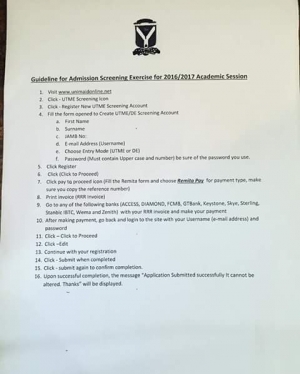
Method Of Application

1.Candidates are to visit www.unimaidonline.net
2. Click - UTME Screening tab
3. Click - "Register New UTME Screening Account"
4. Fill the form opened to create UTME/DE Screening Account
a. First Name
b. Surname
c. JAMB No.
d. Email Address (Username)
e. Choose entry mode(UTME or DE)
5. Click "Register"
6. Click "Click to proceed"
7. Click pay to proceed tab (Fill the Remita form and choose Remita Pay for payment type, make sure you copy the reference number)
8. Print invoice (RRR invoice)
9. Go to any of the following banks( ACCESS, DIAMOND, FCMB, GTBank, Keystone, Skye, Sterling, Stanbic IBTC, Wema and Zenith) with your RRR invoice and make your payment.
10. After making payment, go back and log in to the site with your Username(e-mail address) and password
11. Click - "Click to Proceed"
12. Click - "Edit"
13. Continue with your registration
14. Click - "Submit when completed"
15. Click - "Submit again to confirm completion".
16. Upon successful completion, the message "Application Submitted successfully it cannot be altered. Thanks" will be displayed.

WAEC and NECO CBT Software for Computers and Laptops - Candidates, Schools, Centres, Resellers - 100% Offline -Download Now
WAEC and NECO CBT App for Mobile Devices - Candidates, Schools, Centres, Resellers - 100% Offline -Download Now
Your School's Whatsapp Group - Join Us now

Related Posts

Your School's Whatsapp Group - Join Us now
Post UTME Past Questions Agent
Post-UTME Past Questions - Original materials are available here - Download PDF for your school of choice + 1 year SMS alerts

Comments ({{ comment_count }})

Please wait...

{{ settings.no_comment_msg ? settings.no_comment_msg : 'There are no comments' }}

Quick Questions

Ask Your Own Question
To get notifications when anyone comments,
Follow Comments

Post Comment

Please don't post or ask to join a "Group" or "Whatsapp Group" as a comment. It will be deleted. To join or start a group, please click here

{{ quote.posted_by.display_name }}
{{ settings.form_textarea_description }}
 
WAEC and NECO CBT App for Mobile Devices - Candidates, Schools, Centres, Resellers - 100% Offline -Download Now
Your School's Whatsapp Group - Join Us now
WAEC and NECO CBT Software for Computers and Laptops - Candidates, Schools, Centres, Resellers - 100% Offline -Download Now
Post UTME Past Questions Agent
Post-UTME Past Questions - Original materials are available here - Download PDF for your school of choice + 1 year SMS alerts
Marketplace
Your School's Whatsapp Group - Join Us now
WAEC and NECO CBT Software for Computers and Laptops - Candidates, Schools, Centres, Resellers - 100% Offline -Download Now
Post UTME Past Questions Agent
WAEC and NECO CBT App for Mobile Devices - Candidates, Schools, Centres, Resellers - 100% Offline -Download Now