WAEC and NECO CBT App for Mobile Devices - Candidates, Schools, Centres, Resellers - 100% Offline -Download Now
WAEC and NECO CBT Software for Computers and Laptops - Candidates, Schools, Centres, Resellers - 100% Offline -Download Now

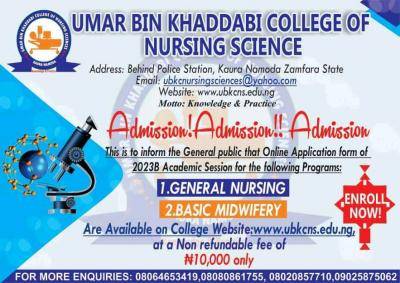
Umar Bin Khaddabi College of Nursing Sciences batch B admission form, 2023/2024

This is to inform the General public that Online Application form of 2023 Batch B Academic Session for the following Programs has commenced:

Post UTME Past Questions Agent
WAEC and NECO CBT Software for Computers and Laptops - Candidates, Schools, Centres, Resellers - 100% Offline -Download Now
Post-UTME Past Questions - Original materials are available here - Download PDF for your school of choice + 1 year SMS alerts

1.GENERAL NURSING

Umar Bin Khaddabi College of Nursing Sciences batch B admission form, 2023/2024

2.BASIC MIDWIFERY

The forms Are Available on College Website: http://www.ubkcns.edu.ng, at a Non refundable fee of N10,000 only

Your School's Whatsapp Group - Join Us now
Post UTME Past Questions Agent
WAEC and NECO CBT Software for Computers and Laptops - Candidates, Schools, Centres, Resellers - 100% Offline -Download Now

APPLICATION FOR ADMISSION PROCEDURE

1. Visit http://www.ubkcns.edu.ng. click on the Student Portal Menu on the left navigation panel and click on Apply for Admission, -> Start Application and fill all requirement, click submit button to process payment via master card, visa card, pos etc. To make payment using your generated RRR return to Student Portal and click Re-print RRR to print your personalized payment invoice (RRR) and go to any commercial bank branch nation wide to make your payment


2. After making the payment, return to the website http://www.ubkcns.edu.ng. Click on Student Portal and click Continue Application enter your RRR Number, Email Address/Phone Number that you have used, to validate your payment. After which you can create your User Name and password. To complete your application form, fill in the personal data form, qualification, course selection etc.

3. Review your forms to ensure accuracy of all the Information you have provided. Click on Submit to complete the application process

4. Print your Acknowledgement Card and Admission Form.

5. When admission has been approved you will be notified through SMS or email address you provided, to check your admission status through your account

6. Visit the web site http://www.ubkcns.edu.ng and print your provisional offer of admission. Click Student Registration from the Student Portal to continue with your registration after making Registration Payment.


Related Posts

Post UTME Past Questions Agent
Your School's Whatsapp Group - Join Us now
WAEC and NECO CBT Software for Computers and Laptops - Candidates, Schools, Centres, Resellers - 100% Offline -Download Now

Comments ({{ comment_count }})

Please wait...

{{ settings.no_comment_msg ? settings.no_comment_msg : 'There are no comments' }}

Quick Questions

Ask Your Own Question
To get notifications when anyone comments,
Follow Comments

Post Comment

Please don't post or ask to join a "Group" or "Whatsapp Group" as a comment. It will be deleted. To join or start a group, please click here

{{ quote.posted_by.display_name }}
{{ settings.form_textarea_description }}
 
Your School's Whatsapp Group - Join Us now
Post UTME Past Questions Agent
WAEC and NECO CBT App for Mobile Devices - Candidates, Schools, Centres, Resellers - 100% Offline -Download Now
Post-UTME Past Questions - Original materials are available here - Download PDF for your school of choice + 1 year SMS alerts
WAEC and NECO CBT Software for Computers and Laptops - Candidates, Schools, Centres, Resellers - 100% Offline -Download Now
Post-UTME Past Questions - Original materials are available here - Download PDF for your school of choice + 1 year SMS alerts
Post UTME Past Questions Agent
WAEC and NECO CBT App for Mobile Devices - Candidates, Schools, Centres, Resellers - 100% Offline -Download Now
Your School's Whatsapp Group - Join Us now