Post-UTME Past Questions - Original materials are available here - Download PDF for your school of choice + 1 year SMS alerts
WAEC and NECO CBT App for Mobile Devices - Candidates, Schools, Centres, Resellers - 100% Offline -Download Now

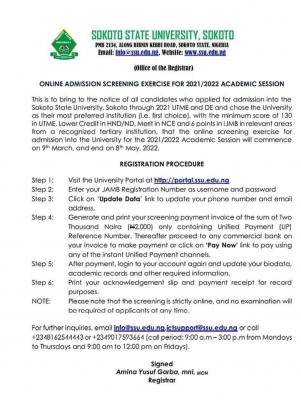
Sokoto State University online admission screening exercise, 2021/2022

This is to bring to the notice of all candidates who applied for admission into the Sokoto State University, Sokoto through 2021 UTME and DE and chose the University as their most preferred Institution (i.e. first choice), with the minimum score of 130 in UTME. Lower Credit in HND/ND. Merit in NCE and 6 points in IJMB in relevant areas from a recognized tertiary institution, that the online screening exercise for admission into the University for the 2021/2022 Academic Session will commence on 9th March, and end on 8th May. 2022.

Post-UTME Past Questions - Original materials are available here - Download PDF for your school of choice + 1 year SMS alerts
WAEC and NECO CBT App for Mobile Devices - Candidates, Schools, Centres, Resellers - 100% Offline -Download Now
Your School's Whatsapp Group - Join Us now

REGISTRATION PROCEDURE

Sokoto State University online admission screening exercise, 2021/2022

Step 1: Visit the University Portal at http://portal.ssu.edu.ng

Step 2: Enter your JAMB Registration Number as username and password

WAEC and NECO CBT App for Mobile Devices - Candidates, Schools, Centres, Resellers - 100% Offline -Download Now
WAEC and NECO CBT Software for Computers and Laptops - Candidates, Schools, Centres, Resellers - 100% Offline -Download Now
Your School's Whatsapp Group - Join Us now

Step 3: Click on 'Update Data' link to update your phone number and email address.

Step 4: Generate and print your screening payment invoice of the sum of Two Thousand Naira (2.000) only containing Unified Payment (UP) Reference Number. Thereafter proceed to any commercial bank on your invoice to make payment or click on 'Pay Now' link to pay using any of the instant Unified Payment channels.

Step 5: After payment, login to your account again and update your biodata.

Step 6: Academic records and other required information. Print your acknowledgment slip and payment receipt for record purposes.

NOTE: Please note that the screening is strictly online, and no examination will be required of applicants at any time.

For further inquiries, email info@ssu.edu.ng.ictsupport@ssu.edu.ng or call +2348162544443 or +2349017593664 (call period:9:00 a.m-3:00p.m from Mondays to Thursdays and 9:00 am to 12:00 pm on Fridays).


Related Posts

Post UTME Past Questions Agent
Your School's Whatsapp Group - Join Us now
WAEC and NECO CBT App for Mobile Devices - Candidates, Schools, Centres, Resellers - 100% Offline -Download Now

Comments ({{ comment_count }})

Please wait...

{{ settings.no_comment_msg ? settings.no_comment_msg : 'There are no comments' }}

Quick Questions

Ask Your Own Question
To get notifications when anyone comments,
Follow Comments

Post Comment

Please don't post or ask to join a "Group" or "Whatsapp Group" as a comment. It will be deleted. To join or start a group, please click here

{{ quote.posted_by.display_name }}
{{ settings.form_textarea_description }}
 
WAEC and NECO CBT Software for Computers and Laptops - Candidates, Schools, Centres, Resellers - 100% Offline -Download Now
Your School's Whatsapp Group - Join Us now
Post-UTME Past Questions - Original materials are available here - Download PDF for your school of choice + 1 year SMS alerts
Post UTME Past Questions Agent
WAEC and NECO CBT App for Mobile Devices - Candidates, Schools, Centres, Resellers - 100% Offline -Download Now
Post-UTME Past Questions - Original materials are available here - Download PDF for your school of choice + 1 year SMS alerts
Your School's Whatsapp Group - Join Us now
Post UTME Past Questions Agent
WAEC and NECO CBT Software for Computers and Laptops - Candidates, Schools, Centres, Resellers - 100% Offline -Download Now