Your School's Whatsapp Group - Join Us now
Post UTME Past Questions Agent

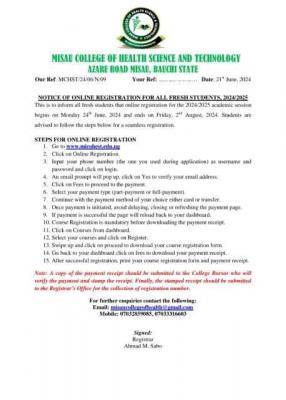
Misau College Of Health Tech notice of online registration for fresh students, 2024/2025

This is to inform all fresh students that online registration for the 2024/2025 academic session begins on Monday 24th June, 2024 and ends on Friday, 2nd August, 2024. Students are advised to follow the steps below for a seamless registration.

Post-UTME Past Questions - Original materials are available here - Download PDF for your school of choice + 1 year SMS alerts
WAEC and NECO CBT App for Mobile Devices - Candidates, Schools, Centres, Resellers - 100% Offline -Download Now
WAEC and NECO CBT Software for Computers and Laptops - Candidates, Schools, Centres, Resellers - 100% Offline -Download Now

STEPS FOR ONLINE REGISTRATION 1. Go to https://micohest.edu.ng/
Misau College Of Health Tech notice of online registration for fresh students, 2024/2025

2. Click on Online Registration.

3. Input your phone number (the one you med during application) as username and password and click on login.

WAEC and NECO CBT Software for Computers and Laptops - Candidates, Schools, Centres, Resellers - 100% Offline -Download Now
Post-UTME Past Questions - Original materials are available here - Download PDF for your school of choice + 1 year SMS alerts
Post UTME Past Questions Agent

4. An email prompt will pop up, click on Yes to verify your email address,

5. Click on Fees to proceed to the payment.

6. Select your payment type (part-payment or full-payment).

7. Continue with the payment method of your choice either card or transfer.

8. Once payment is initiated, avoid delaying, closing or refreshing the payment page.

9. If payment is successful the page will reload back to your dashboard.

10. Course Registration is mandatory before downloading the payment receipt.

11. Click on Courses from dashboard.

12. Select your courses and click on Register.

13. Swipe up and click on proceed to download your course registration form.

14. Go back to your dashboard click on fees to download your payment receipt.

15. After successful registration, print your course registration form and payment receipt.

Note: A copy of the payment receipt should be submitted to the College Bursar who will verify the payment and stamp the receipt. Finally, the stamped recript should be submitted to the Registrar's Office for the collection of registration number.

For further enquiries contact the following:

  • Email: missncollegeofhealth@gmail.com
  • Mobile: 07032859085, 07033316663

Related Posts

Post-UTME Past Questions - Original materials are available here - Download PDF for your school of choice + 1 year SMS alerts
WAEC and NECO CBT App for Mobile Devices - Candidates, Schools, Centres, Resellers - 100% Offline -Download Now
WAEC and NECO CBT Software for Computers and Laptops - Candidates, Schools, Centres, Resellers - 100% Offline -Download Now

Comments ({{ comment_count }})

Please wait...

{{ settings.no_comment_msg ? settings.no_comment_msg : 'There are no comments' }}

Quick Questions

Ask Your Own Question
To get notifications when anyone comments,
Follow Comments

Post Comment

Please don't post or ask to join a "Group" or "Whatsapp Group" as a comment. It will be deleted. To join or start a group, please click here

{{ quote.posted_by.display_name }}
{{ settings.form_textarea_description }}
 
WAEC and NECO CBT Software for Computers and Laptops - Candidates, Schools, Centres, Resellers - 100% Offline -Download Now
WAEC and NECO CBT App for Mobile Devices - Candidates, Schools, Centres, Resellers - 100% Offline -Download Now
Post-UTME Past Questions - Original materials are available here - Download PDF for your school of choice + 1 year SMS alerts
Post UTME Past Questions Agent