Post UTME Past Questions Agent
WAEC and NECO CBT Software for Computers and Laptops - Candidates, Schools, Centres, Resellers - 100% Offline -Download Now

LASCON ND/HND admission form for 2026/2027 session

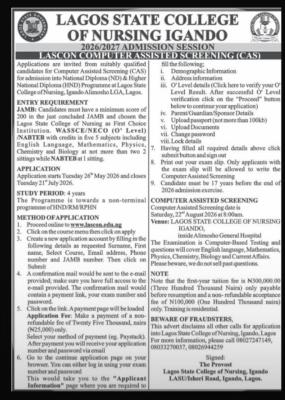
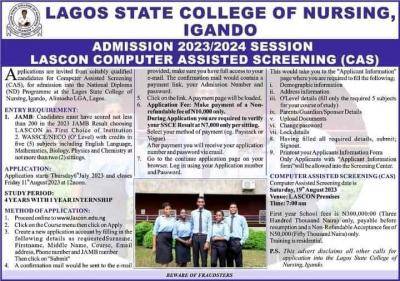
Applications are invited from suitably qualified candidates for Computer Assisted Screening (CAS) for admission into National Diploma (ND) & Higher National Diploma (HND) Non-Terminal Programme at Lagos State College of Nursing, Igando, Alimosho LGA, Lagos State.

WAEC and NECO CBT App for Mobile Devices - Candidates, Schools, Centres, Resellers - 100% Offline -Download Now
Post UTME Past Questions Agent
Post-UTME Past Questions - Original materials are available here - Download PDF for your school of choice + 1 year SMS alerts

ENTRY REQUIREMENT

LASCON ND/HND admission form for 2026/2027 session

JAMB: Candidates must have scored 200 and above in the just concluded JAMB and chosen the Lagos State College of Nursing, Igando, as First Choice Institution

WASSCE/NECO (O' Level) with credits in five 5 subjects including English Language, Mathematics, Physics, Chemistry and Biology at not more than two 2 sittings.

WAEC and NECO CBT Software for Computers and Laptops - Candidates, Schools, Centres, Resellers - 100% Offline -Download Now
WAEC and NECO CBT App for Mobile Devices - Candidates, Schools, Centres, Resellers - 100% Offline -Download Now
Your School's Whatsapp Group - Join Us now

APPLICATION

  • Application starts Tuesday 26th May 2026 and closes Tuesday 21th July 2026.

STUDY PERIOD: 4 years

  • NRN/RN Programme towards a non-terminal programme of HND/RM/RPHN and a mandatory internship

COMPUTER ASSISTED SCREENING

  • Computer Assisted Screening date is Saturday, 22th August 2026 at 8:00am.
  • VENUE:LAGOS STATE COLLEGE OF NURSING IGANDO inside Alimosho General Hospital

The Examination is Computer-Based Testing and questions will cover English language, Mathematics, Physics, Chemistry, Biology and Current Affairs.

METHOD OF APPLICATION:

1. Proceed online to www.lascon.edu.ng

2. Click on the Course menu then click on Apply

3. Create a new application account by filling in the following details as requested Surname, First name, Select Course, Email address, Phone number and JAMB number. Then click on Submit

4. A confirmation mail would be sent to the e-mail provided, make sure you have full access to the e-mail provided. The confirmation mail would contain a payment link, your Admission Number and password.

5. Click on the link. A payment page will be loaded.

  • Application Fee: Make a payment of a Non-refundable fee of Twenty-Five Thousand naira (25,000) only.
  • Select your method of payment (eg. Paystack). After payment you will receive your application number and password via email

6. Go to the continue application page on your browser. You can either log in using your admission number and password. This would take you to the "Applicant Information" page where you are required to fill the following:

  • Demographic Information
  • Address information
  • O' Level details (Click here to verify your O' Level Result. After successful O' Level verification click on the "Proceed" button below to continue your application)
  • Parent/Guardian/Sponsor Details
  • Upload passport (not more than 100kb)
  • Upload Documents
  • Change password
  • Lock details

7. Having filled all required details above, click on the submit button and Sign out 

8. Print out your Applicant Information Form. Only Applicants with the Form will be allowed to write the Computer Assisted Screening examination

9. Applicants must be 17 years before the end of the 2026 admission exercise

The Examination is Computer-Based Testing and questions will cover English language, Mathematics, Physics, Chemistry, Biology and Current Affairs.

NOTE

  • Note that the first year School fees is N300,000.00 (Three 8. Hundred Thousand Naira) only payable before resumption and a non-refundable acceptance fee of N100,000 (One Hundred Thousand naira) only. Training is residential

Related Posts

Post UTME Past Questions Agent
Post-UTME Past Questions - Original materials are available here - Download PDF for your school of choice + 1 year SMS alerts
WAEC and NECO CBT App for Mobile Devices - Candidates, Schools, Centres, Resellers - 100% Offline -Download Now

Comments ({{ comment_count }})

Please wait...

{{ settings.no_comment_msg ? settings.no_comment_msg : 'There are no comments' }}

Quick Questions

Ask Your Own Question
To get notifications when anyone comments,
Follow Comments

Post Comment

Please don't post or ask to join a "Group" or "Whatsapp Group" as a comment. It will be deleted. To join or start a group, please click here

{{ quote.posted_by.display_name }}
{{ settings.form_textarea_description }}
 
Post UTME Past Questions Agent
Post-UTME Past Questions - Original materials are available here - Download PDF for your school of choice + 1 year SMS alerts
Your School's Whatsapp Group - Join Us now
WAEC and NECO CBT Software for Computers and Laptops - Candidates, Schools, Centres, Resellers - 100% Offline -Download Now
WAEC and NECO CBT App for Mobile Devices - Candidates, Schools, Centres, Resellers - 100% Offline -Download Now
WAEC and NECO CBT Software for Computers and Laptops - Candidates, Schools, Centres, Resellers - 100% Offline -Download Now
WAEC and NECO CBT App for Mobile Devices - Candidates, Schools, Centres, Resellers - 100% Offline -Download Now
Post-UTME Past Questions - Original materials are available here - Download PDF for your school of choice + 1 year SMS alerts
Post UTME Past Questions Agent