WAEC and NECO CBT App for Mobile Devices - Candidates, Schools, Centres, Resellers - 100% Offline -Download Now
Your School's Whatsapp Group - Join Us now

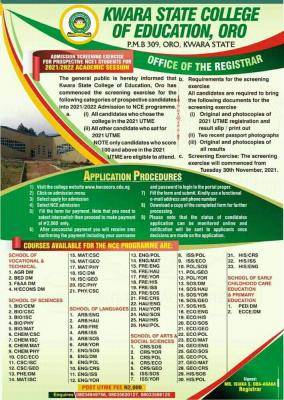
Kwara College of Education, Oro NCE admission, 2021/2022

The general public is hereby informed that Kwara State College of Education, Oro has commenced the screening exercise for the following categories of prospective candidates into 2021/2022 Admission to NCE programme.

WAEC and NECO CBT App for Mobile Devices - Candidates, Schools, Centres, Resellers - 100% Offline -Download Now
WAEC and NECO CBT Software for Computers and Laptops - Candidates, Schools, Centres, Resellers - 100% Offline -Download Now
Post-UTME Past Questions - Original materials are available here - Download PDF for your school of choice + 1 year SMS alerts

(1) All candidates who chose the college in the 2021 UTME
Kwara College of Education, Oro NCE admission, 2021/2022

(ii) All other candidate who sat for 2021 UTME

NOTE: only candidates who score 100 and above in the 2021 UTME are eligible to attend.

Post UTME Past Questions Agent
WAEC and NECO CBT Software for Computers and Laptops - Candidates, Schools, Centres, Resellers - 100% Offline -Download Now
Post-UTME Past Questions - Original materials are available here - Download PDF for your school of choice + 1 year SMS alerts

Requirements for the screening exercise

All candidates are required to bring the following documents for the screening exercise;

(1) Original and photocopies of 2021 UTME registration and result slip/ print out

(ii) Two recent passport photographs

(iii) Original and photocopies of all results.

METHOD OF APPLICATION 

1. Visit the college website www.kwcooro.edu.ng

2. Click on admission menu

3. Select apply for admission

4) Select NCE admission

5) Fill the form for payment.

Note that you need to select interswitch then proceed to make payment of #2,000 only

6) After successful payment you will receive sms confirming the payment including your username and password to login to the portal properly

7) Fill the form and submit. Kindly use a functional e-mail address and phone number

8) Download a copy of the completed form for further processing

9) Please note that the status of candidates application can be monitored online and notification will be sent to applicants once decisions are made on the application.


Related Posts

Post UTME Past Questions Agent
WAEC and NECO CBT App for Mobile Devices - Candidates, Schools, Centres, Resellers - 100% Offline -Download Now
Post-UTME Past Questions - Original materials are available here - Download PDF for your school of choice + 1 year SMS alerts

Comments ({{ comment_count }})

Please wait...

{{ settings.no_comment_msg ? settings.no_comment_msg : 'There are no comments' }}
To get notifications when anyone comments,
Follow Comments

Post Comment

Please don't post or ask to join a "Group" or "Whatsapp Group" as a comment. It will be deleted. To join or start a group, please click here

{{ quote.posted_by.display_name }}
{{ settings.form_textarea_description }}
 
WAEC and NECO CBT App for Mobile Devices - Candidates, Schools, Centres, Resellers - 100% Offline -Download Now
WAEC and NECO CBT Software for Computers and Laptops - Candidates, Schools, Centres, Resellers - 100% Offline -Download Now
Post-UTME Past Questions - Original materials are available here - Download PDF for your school of choice + 1 year SMS alerts
Your School's Whatsapp Group - Join Us now
Post UTME Past Questions Agent
Post-UTME Past Questions - Original materials are available here - Download PDF for your school of choice + 1 year SMS alerts
WAEC and NECO CBT Software for Computers and Laptops - Candidates, Schools, Centres, Resellers - 100% Offline -Download Now
Your School's Whatsapp Group - Join Us now
WAEC and NECO CBT App for Mobile Devices - Candidates, Schools, Centres, Resellers - 100% Offline -Download Now