WAEC and NECO CBT Software for Computers and Laptops - Candidates, Schools, Centres, Resellers - 100% Offline -Download Now
Post-UTME Past Questions - Original materials are available here - Download PDF for your school of choice + 1 year SMS alerts

Kano State Polytechnic Registration steps for fresh students, 2025/2026

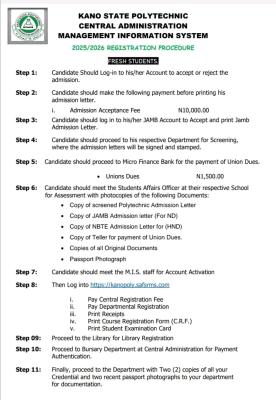
The Management of Kano State Polytechnic, through the Central Administration Management Information System (MIS), has released the official registration procedure for newly admitted students for the 2025/2026 academic session.

Your School's Whatsapp Group - Join Us now
WAEC and NECO CBT Software for Computers and Laptops - Candidates, Schools, Centres, Resellers - 100% Offline -Download Now
Post-UTME Past Questions - Original materials are available here - Download PDF for your school of choice + 1 year SMS alerts

According to the notice, fresh students are required to follow the outlined steps to complete their registration successfully.

Kano State Polytechnic Registration steps for fresh students,  2025/2026

The procedure begins with candidates logging into their admission portal to accept or reject their admission. the steps are as follows;

Step 1: Candidate Should Log-in to his/her Account to accept or reject the admission.

WAEC and NECO CBT App for Mobile Devices - Candidates, Schools, Centres, Resellers - 100% Offline -Download Now
WAEC and NECO CBT Software for Computers and Laptops - Candidates, Schools, Centres, Resellers - 100% Offline -Download Now
Post-UTME Past Questions - Original materials are available here - Download PDF for your school of choice + 1 year SMS alerts

Step 2: Candidate should make the following payment before printing his admission letter.

Admission Acceptance Fee : N10,000.00

Step 3: Candidate should log in to his/her JAMB Account to Accept and print Jamb Admission Letter.

Step 4: Candidate should proceed to his respective Department for Screening, where the admission letters will be signed and stamped.

Step 5: Candidate should proceed to Micro Finance Bank for the payment of Union Dues.

• Unions Dues

N1,500.00

Step 6: Candidate should meet the Students Affairs Officer at their respective School for Assessment with photocopies of the following Documents:

• Copy of screened Polytechnic Admission Letter

• Copy of JAMB Admission letter (For ND)

• Copy of NBTE Admission Letter for (HND)

Copy of Teller for payment of Union Dues.

• Copies of all Original Documents

Passport Photograph

Step 7: Candidate should meet the M.I.S. staff for Account Activation.

Step 8: Then Log into https://kanopoly.safsrms.com

i. Pay Central Registration Fee

ii. Pay Departmental Registration

iii. Print Receipts

iv. Print Course Registration Form (C.R.F.)

V. Print Student Examination Card

Step 9: Proceed to the Library for Library Registration.

Step 10: Proceed to Bursary Department at Central Administration for Payment Authentication.

Step 11: Finally, proceed to the Department with Two (2) copies of all your Credential and two recent passport photographs to your department for documentation.

Related Posts

Your School's Whatsapp Group - Join Us now
Post UTME Past Questions Agent
Post-UTME Past Questions - Original materials are available here - Download PDF for your school of choice + 1 year SMS alerts

Comments ({{ comment_count }})

Please wait...

{{ settings.no_comment_msg ? settings.no_comment_msg : 'There are no comments' }}

Quick Questions

Ask Your Own Question
To get notifications when anyone comments,
Follow Comments

Post Comment

Please don't post or ask to join a "Group" or "Whatsapp Group" as a comment. It will be deleted. To join or start a group, please click here

{{ quote.posted_by.display_name }}
{{ settings.form_textarea_description }}
 
WAEC and NECO CBT App for Mobile Devices - Candidates, Schools, Centres, Resellers - 100% Offline -Download Now
Your School's Whatsapp Group - Join Us now
Post-UTME Past Questions - Original materials are available here - Download PDF for your school of choice + 1 year SMS alerts
Post UTME Past Questions Agent
WAEC and NECO CBT Software for Computers and Laptops - Candidates, Schools, Centres, Resellers - 100% Offline -Download Now
Post UTME Past Questions Agent
WAEC and NECO CBT Software for Computers and Laptops - Candidates, Schools, Centres, Resellers - 100% Offline -Download Now
Post-UTME Past Questions - Original materials are available here - Download PDF for your school of choice + 1 year SMS alerts
WAEC and NECO CBT App for Mobile Devices - Candidates, Schools, Centres, Resellers - 100% Offline -Download Now