Your School's Whatsapp Group - Join Us now
Post-UTME Past Questions - Original materials are available here - Download PDF for your school of choice + 1 year SMS alerts

Kano State college of Nursing and Midwifery Admission, 2021/2022

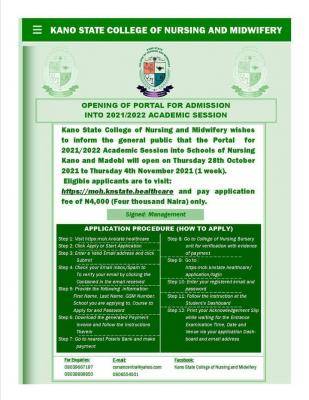
Kano State College of Nursing and Midwifery wishes to inform the general public that the Portal for 2021/2022 Academic Session into Schools of Nursing Kano and Madobi will open from Thursday 28th October 2021 to Thursday 4th November 2021 (1 week).

WAEC and NECO CBT Software for Computers and Laptops - Candidates, Schools, Centres, Resellers - 100% Offline -Download Now
Post UTME Past Questions Agent
WAEC and NECO CBT App for Mobile Devices - Candidates, Schools, Centres, Resellers - 100% Offline -Download Now

Eligible applicants are to visit: https://moh.knstate.healthcare and pay the application fee of N4,000 (Four thousand Naira) only.
Kano State college of Nursing and Midwifery Admission, 2021/2022

APPLICATION PROCEDURE (HOW TO APPLY)

Step 1: Visit https://moh.knstate.healthcare

Post UTME Past Questions Agent
WAEC and NECO CBT Software for Computers and Laptops - Candidates, Schools, Centres, Resellers - 100% Offline -Download Now
Post-UTME Past Questions - Original materials are available here - Download PDF for your school of choice + 1 year SMS alerts

Step 2: Click Apply or Start Application

Step 3. Enter a Valid Email address and click Submit

Step 4: Check your Email inbox/Spam to To verify your email by clicking the Content in the email received 

Step 5 : Provide the following information: First Name, Last Name GSM Number School you are applying to Course to Apply for and Password

Step 6 : Download the generated Payment Invoice and follow the instructions therein

Step 7 Go to nearest Polaris Bank and make payment

Step 8 : Go to College of Nursing Bursary unit for verification with evidence of payment

Step 9: Go to https://moh.knstate.healthcare/applicants/login

Step 10: Enter your registered email and password

Step 11: Follow the instruction at the Students Dashboard Step

12: Print your Acknowledgement Slip while waiting for the Entrance Examination Time, Date and Venue via your application Dash board and email address


Related Posts

Post-UTME Past Questions - Original materials are available here - Download PDF for your school of choice + 1 year SMS alerts
WAEC and NECO CBT App for Mobile Devices - Candidates, Schools, Centres, Resellers - 100% Offline -Download Now
Post UTME Past Questions Agent

Comments ({{ comment_count }})

Please wait...

{{ settings.no_comment_msg ? settings.no_comment_msg : 'There are no comments' }}

Quick Questions

Ask Your Own Question
To get notifications when anyone comments,
Follow Comments

Post Comment

Please don't post or ask to join a "Group" or "Whatsapp Group" as a comment. It will be deleted. To join or start a group, please click here

{{ quote.posted_by.display_name }}
{{ settings.form_textarea_description }}
 
Your School's Whatsapp Group - Join Us now
Post-UTME Past Questions - Original materials are available here - Download PDF for your school of choice + 1 year SMS alerts
WAEC and NECO CBT App for Mobile Devices - Candidates, Schools, Centres, Resellers - 100% Offline -Download Now
WAEC and NECO CBT Software for Computers and Laptops - Candidates, Schools, Centres, Resellers - 100% Offline -Download Now