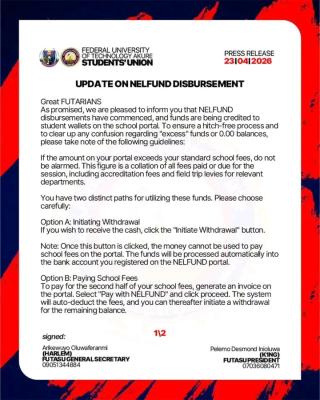
As promised, we are pleased to inform you that NELFUND disbursements have commenced, and funds are being credited to student wallets on the school portal. To ensure a hitch-free process and to clear up any confusion regarding "excess" funds or 0.00 balances, please take note of the following guidelines:


If the amount on your portal exceeds your standard school fees, do not be alarmed. This figure is a collation of all fees paid or due for the session, including accreditation fees and field trip levies for relevant departments.
You have two distinct paths for utilizing these funds. Please choose carefully:
Option A: Initiating Withdrawal

If you wish to receive the cash, click the "Initiate Withdrawal" button.
Note: Once this button is clicked, the money cannot be used to pay school fees on the portal. The funds will be processed automatically into the bank account you registered on the NELFUND portal.
Option B: Paying School Fees
To pay for the second half of your school fees, generate an invoice on the portal. Select "Pay with NÉLFUND" and click proceed. The system will auto-deduct the fees, and you can thereafter initiate a withdrawal for the remaining balance.
If your portal currently shows a balance of 0.00, do not panic. As stated in previous communications, disbursements are being made in batches.
Your funds will reflect as soon as your disbursement is processed by the university in as much you applied for this session NELFUND.
In line with our efforts to automate processes, most students are not required to visit the Bursary. You only need to visit the Bursary if:
1. You have a pending withdrawal issue from the previous year.
2. The bank account provided on the NELFUND portal has a transaction limit that cannot accommodate the refund.
3. The account details provided are incorrect or the account name does not match the name on your school portal.
The refund process may take days, weeks, or even months depending on your batch. We are working tirelessly to ensure the process is worked on so that every student receives their refund as soon as possible.
Thank you for your continued patience and cooperation.






Comments ({{ comment_count }})
Please wait...
Modal title
Report
Block User
{{ feedback_modal_data.title }}