WAEC and NECO CBT Software for Computers and Laptops - Candidates, Schools, Centres, Resellers - 100% Offline -Download Now
Your School's Whatsapp Group - Join Us now

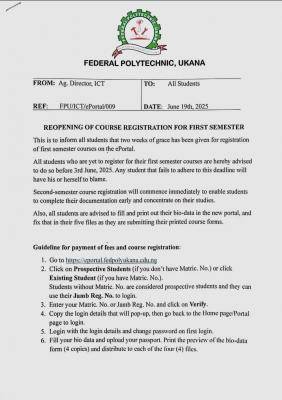
Federal Poly, Ukana issues notice on reopening of course registration for first semester, 2024/2025

This is to inform all students of the Federal Polytechnic, Ukana that two weeks of grace has been given for registration of first semester courses on the ePortal.

WAEC and NECO CBT App for Mobile Devices - Candidates, Schools, Centres, Resellers - 100% Offline -Download Now
WAEC and NECO CBT Software for Computers and Laptops - Candidates, Schools, Centres, Resellers - 100% Offline -Download Now
Post-UTME Past Questions - Original materials are available here - Download PDF for your school of choice + 1 year SMS alerts

All students who are yet to register for their first semester courses are hereby advised to do so before 3rd July, 2025. Any student that fails to adhere to this deadline will have his/herself to blame.

Federal Poly, Ukana issues notice on reopening of course registration for first semester, 2024/2025

Second semester course registration will commence immediately to enable students to complete their documentation early and concentrate on their studies.

Also, all students are advised to fill and print out their bio-data in the new portal and fix that in their five files as they are submitting their printed course forms.

WAEC and NECO CBT App for Mobile Devices - Candidates, Schools, Centres, Resellers - 100% Offline -Download Now
Post-UTME Past Questions - Original materials are available here - Download PDF for your school of choice + 1 year SMS alerts
Post UTME Past Questions Agent

Guidelines for payment of fees and course registration;

1. Go to https://ePortal.fedpolyukana.edu.ng 

2. Click on prospective student (if you don't have a Matric. No.) or click on existing student (if you've a Matric. No.). Students without Matric. No. are considered prospective students and they can use their JAMB registration number to log in

3. Enter your Matric No. or JAMB registration number and click on verify

4. Copy the login details that will pop up, then go back to the home page/portal page to login

5. Login with the login details and change password on first login

6. Fill your bio-data and upload your passport. Print the preview of the bio-data form (4 copies) and distribute to each of the 4 files

7. Click on 'other fees' to pay acceptance fee, generate invoice with RRR, proceed to make payment online with your card, via transfer or any other option available in the Remita gateway

8. Print out the receipt and take it to the Bursary (student account) to be stamped and signed upon confirmation of payment

9. Click on 'course registration' tab, select the section, semester, then select the courses you're offering from the pool of courses that will appear. Select register and print out the form

10. Note that the same platform will always be used to check your results, hence you should keep your login details safe.

To this end, the Class Reps/Course Reps should go to the ICT Office on the Library Building (Upstairs), with list of courses signed by their HOD to update their courses on the portal for all sessions, latest on Monday, 23rd June, 2025. 

Note; 

Students that have not paid their school fees will not be able to register their courses on the portal.

Be informed accordingly, please. Thank you!

Related Posts

Post UTME Past Questions Agent
Post-UTME Past Questions - Original materials are available here - Download PDF for your school of choice + 1 year SMS alerts
WAEC and NECO CBT App for Mobile Devices - Candidates, Schools, Centres, Resellers - 100% Offline -Download Now

Comments ({{ comment_count }})

Please wait...

{{ settings.no_comment_msg ? settings.no_comment_msg : 'There are no comments' }}

Quick Questions

Ask Your Own Question
To get notifications when anyone comments,
Follow Comments

Post Comment

Please don't post or ask to join a "Group" or "Whatsapp Group" as a comment. It will be deleted. To join or start a group, please click here

{{ quote.posted_by.display_name }}
{{ settings.form_textarea_description }}
 
WAEC and NECO CBT Software for Computers and Laptops - Candidates, Schools, Centres, Resellers - 100% Offline -Download Now
WAEC and NECO CBT App for Mobile Devices - Candidates, Schools, Centres, Resellers - 100% Offline -Download Now
Post-UTME Past Questions - Original materials are available here - Download PDF for your school of choice + 1 year SMS alerts
Your School's Whatsapp Group - Join Us now
Post UTME Past Questions Agent
Post-UTME Past Questions - Original materials are available here - Download PDF for your school of choice + 1 year SMS alerts
WAEC and NECO CBT App for Mobile Devices - Candidates, Schools, Centres, Resellers - 100% Offline -Download Now
WAEC and NECO CBT Software for Computers and Laptops - Candidates, Schools, Centres, Resellers - 100% Offline -Download Now
Post UTME Past Questions Agent