Post-UTME Past Questions - Original materials are available here - Download PDF for your school of choice + 1 year SMS alerts
Your School's Whatsapp Group - Join Us now

COOU Post-UTME/DE 2026: Cut-off mark, Eligibility and Registration Details

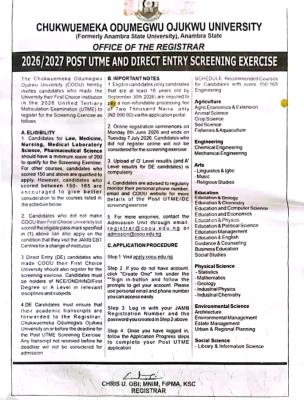
The Chukwuemeka Odumegwu Ojukwu University (COOU) hereby invites candidates who made the University their First Choice Institution in the 2026 Unified Tertiary Matriculation Examination (UTME) to register for the Screening Exercise as follows:

WAEC and NECO CBT App for Mobile Devices - Candidates, Schools, Centres, Resellers - 100% Offline -Download Now
Post-UTME Past Questions - Original materials are available here - Download PDF for your school of choice + 1 year SMS alerts
Your School's Whatsapp Group - Join Us now

​A. ELIGIBILITY

COOU Post-UTME/DE 2026: Cut-off mark, Eligibility and Registration Details

​1. Candidates for Law, Medicine, Nursing, Medical Laboratory Science, Pharmaceutical Science should have a minimum score of 200 to qualify for the Screening Exercise. For other courses, candidates who scored 150 and above are qualified to apply. However, candidates who scored between 150 - 165 are encouraged to give better consideration to the courses listed in the schedule below.

​2. Candidates who did not make COOU their First Choice University but scored the eligible pass mark specified in (1) above can also apply on the condition that they visit the JAMB CBT Centres for a change of institution.

WAEC and NECO CBT App for Mobile Devices - Candidates, Schools, Centres, Resellers - 100% Offline -Download Now
Post UTME Past Questions Agent
WAEC and NECO CBT Software for Computers and Laptops - Candidates, Schools, Centres, Resellers - 100% Offline -Download Now

​3. Direct Entry (DE) candidates who made COOU their First Choice University should also register for the screening exercise. Candidates must be holders of NCE/OND/HND/First Degree or A Level in relevant disciplines and subjects.

​4. DE Candidates must ensure that their academic transcripts are forwarded to the Registrar, Chukwuemeka Odumegwu Ojukwu University on or before the deadline for the Post UTME Screening Exercise. Any transcript not received before the deadline will not be considered for admission.

​B. IMPORTANT NOTES

​1. Eligible candidates (only candidates that are at least 16 years old by September 30th 2026) are required to pay a non-refundable processing fee of Two Thousand Naira, only (N2,000.00) via the application portal.

​2. Online registration commences on Monday 8th June 2026 and ends on Tuesday 7 July 2026. Candidates who did not register online will not be considered for the screening exercise.

​3. Upload of O' Level result/s (and A' Level result/s for DE candidates) is compulsory.

​4. Candidates are advised to regularly monitor their personal phone number, email and COOU website for more details of the Post UTME/DE screening exercise.

​5. For more enquiries, contact the Admission Unit through email: registrar@coou.edu.ng or admission@coou.edu.ng.

SCHEDULE - Recommended Courses for Candidates with score 150-165

​Agriculture

​Agric Economics & Extension

​Animal Science

​Crop Science

​Soil Science

​Fisheries & Aquaculture

​Engineering

​Chemical Engineering

​Mechanical Engineering

​Arts

​Linguistics & Igbo

​Music

​Religious Studies

​Education

​Education & Biology

​Education & Chemistry

​Education and Computer Science

​Education and Economics

​Education & Physics

​Education & Political Science

​Education Management

​Education & English

​Guidance & Counseling

​Business Education

​Social Studies

​Physical Science

​Statistics

​Mathematics

​Geology

​Industrial Physics

​Industrial Chemistry

​Environmental Science

​Architecture

​Environmental Management

​Estate Management

​Urban & Regional Planning

​Social Science

​Library & Information Science

APPLICATION PROCEDURE

​Step 1: Visit apply.coou.edu.ng

​Step 2: If you do not have account, click "Create One" link under the "Sign in-button" and follow the prompts to get your account, Please use personal email and phone number you can access easily.

​Step 3: Log in with your JAMB Registration Number and the password you created in Step 2 above.

​Step 4: Once you have logged in, follow the Application Progress steps to complete your Post UTME application.

Signed:

CHRIS U. OBI; MNIM, FIPMA, KSC

REGISTRAR

Related Posts

WAEC and NECO CBT Software for Computers and Laptops - Candidates, Schools, Centres, Resellers - 100% Offline -Download Now
Post UTME Past Questions Agent
Post-UTME Past Questions - Original materials are available here - Download PDF for your school of choice + 1 year SMS alerts

Comments ({{ comment_count }})

Please wait...

{{ settings.no_comment_msg ? settings.no_comment_msg : 'There are no comments' }}

Quick Questions

Ask Your Own Question
To get notifications when anyone comments,
Follow Comments

Post Comment

Please don't post or ask to join a "Group" or "Whatsapp Group" as a comment. It will be deleted. To join or start a group, please click here

{{ quote.posted_by.display_name }}
{{ settings.form_textarea_description }}
 
WAEC and NECO CBT App for Mobile Devices - Candidates, Schools, Centres, Resellers - 100% Offline -Download Now
WAEC and NECO CBT Software for Computers and Laptops - Candidates, Schools, Centres, Resellers - 100% Offline -Download Now
Your School's Whatsapp Group - Join Us now
Post-UTME Past Questions - Original materials are available here - Download PDF for your school of choice + 1 year SMS alerts
Post UTME Past Questions Agent
Marketplace
WAEC and NECO CBT Software for Computers and Laptops - Candidates, Schools, Centres, Resellers - 100% Offline -Download Now
Post-UTME Past Questions - Original materials are available here - Download PDF for your school of choice + 1 year SMS alerts
WAEC and NECO CBT App for Mobile Devices - Candidates, Schools, Centres, Resellers - 100% Offline -Download Now
Post UTME Past Questions Agent