WAEC and NECO CBT Software for Computers and Laptops - Candidates, Schools, Centres, Resellers - 100% Offline -Download Now
Post-UTME Past Questions - Original materials are available here - Download PDF for your school of choice + 1 year SMS alerts

Abraham Adesanya Poly Post UTME 2024: Eligibility and Registration Details

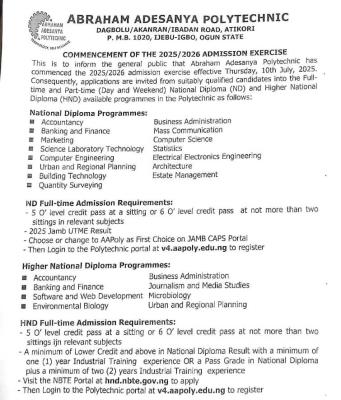
Applications are invited from suitably qualified candidates choose the polytechnic in the 2024 UTME for admission into National Diploma programmes of Abraham Adesanya Polytechnic 2024/2025

Post UTME Past Questions Agent
WAEC and NECO CBT Software for Computers and Laptops - Candidates, Schools, Centres, Resellers - 100% Offline -Download Now
WAEC and NECO CBT App for Mobile Devices - Candidates, Schools, Centres, Resellers - 100% Offline -Download Now

 Programme Curriculum

Abraham Adesanya Poly Post UTME 2024: Eligibility and Registration Details

1 ACCOUNTANCY Full Time

2 URBAN AND REGIONAL PLANNING Full Time

WAEC and NECO CBT Software for Computers and Laptops - Candidates, Schools, Centres, Resellers - 100% Offline -Download Now
WAEC and NECO CBT App for Mobile Devices - Candidates, Schools, Centres, Resellers - 100% Offline -Download Now
Post UTME Past Questions Agent

3 BUSINESS ADMINISTRATION Full Time

4 BANKING AND FINANCE Full Time 

5 MASS COMMUNICATION Full Time

6 MARKETING Full Time 

7 SCIENCE LABORATORY TECHNOLOGY Full Time ND

8 COMPUTER SCIENCE Full Time ND

9 ELECTRICAL AND ELECTRONICS ENGINEERING Full Time ND

10 COMPUTER ENGINEERING Full Time ND

METHOD OF APPLICATION

1. Click on this link http://v4.aapoly.edu.ng/admission/apply/create_account/1

2. Enter your jamb registration number and create account

(Please fill the form correctly and supply a VALID EMAIL ADDRESS because your login details will be sent to whatever email address you provide)

3. Check your email inbox (or Spam) for your Applicant ID and Password

4. Return to the website and Click Login to access Application Form

5. Continue by paying the necessary fees and then carefully filling the Application Form and click submit.

6. Print the Application form and Examination Slip with the examination date on it.

Related Posts

WAEC and NECO CBT Software for Computers and Laptops - Candidates, Schools, Centres, Resellers - 100% Offline -Download Now
Your School's Whatsapp Group - Join Us now
Post UTME Past Questions Agent

Comments ({{ comment_count }})

Please wait...

{{ settings.no_comment_msg ? settings.no_comment_msg : 'There are no comments' }}

Quick Questions

Ask Your Own Question
To get notifications when anyone comments,
Follow Comments

Post Comment

Please don't post or ask to join a "Group" or "Whatsapp Group" as a comment. It will be deleted. To join or start a group, please click here

{{ quote.posted_by.display_name }}
{{ settings.form_textarea_description }}
 
Post UTME Past Questions Agent
Your School's Whatsapp Group - Join Us now
Post-UTME Past Questions - Original materials are available here - Download PDF for your school of choice + 1 year SMS alerts
WAEC and NECO CBT App for Mobile Devices - Candidates, Schools, Centres, Resellers - 100% Offline -Download Now
WAEC and NECO CBT Software for Computers and Laptops - Candidates, Schools, Centres, Resellers - 100% Offline -Download Now
Marketplace
WAEC and NECO CBT App for Mobile Devices - Candidates, Schools, Centres, Resellers - 100% Offline -Download Now
WAEC and NECO CBT Software for Computers and Laptops - Candidates, Schools, Centres, Resellers - 100% Offline -Download Now
Post UTME Past Questions Agent
Your School's Whatsapp Group - Join Us now