Post UTME Past Questions Agent
WAEC and NECO CBT App for Mobile Devices - Candidates, Schools, Centres, Resellers - 100% Offline -Download Now

FUTO Resumption From Mid semester Break And Procedure For Payment Of Surcharge

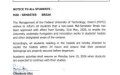
All students of the Federal University Of Technology, Owerri are hereby informed that the University will resume academic activities in continuation of the 2016/2017 Harmattan Semester as follows:

Post-UTME Past Questions - Original materials are available here - Download PDF for your school of choice + 1 year SMS alerts
WAEC and NECO CBT App for Mobile Devices - Candidates, Schools, Centres, Resellers - 100% Offline -Download Now
WAEC and NECO CBT Software for Computers and Laptops - Candidates, Schools, Centres, Resellers - 100% Offline -Download Now

Year One students of the Institution would be expected to return on Monday May 8, 2017. Year 2&3 students would return two days later (i.e May 10) whereas Year Four and Five would return May 15th, 2017.

Each student would be allowed to enter the university premises only on presentation of the following;

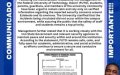
i Evidence of payment of the sum of N12,500 being fine levied on the students for their misconduct and destruction of school properties in the violent protests that took place in February 2017.

Post-UTME Past Questions - Original materials are available here - Download PDF for your school of choice + 1 year SMS alerts
Post UTME Past Questions Agent
WAEC and NECO CBT Software for Computers and Laptops - Candidates, Schools, Centres, Resellers - 100% Offline -Download Now

ii. A notarized undertaking of good behavior

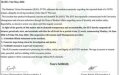
Students are therefore advised to pay all their fees plus the surcharge and obtain the notarized undertaking before the resumption date.

All undergraduate students should note that the 2016/2017 Harmattan Semester examinations will commence 3 weeks after resumption of studies.

Online Process for the payment of the “Surcharge Fee”

-Visit the university website: www.futo.edu.ng
-Click on the link ‘Portal’ (portal.futo.edu.ng)
-Click on ‘Surcharge Fee’
-Generate “Surcharge Fee” payment invoice
-Print your invoice and proceed to any Commercial Bank to make payment using the RRR code on the invoice.
-Return to the Portal and Download the “Notarised Undertaken Form”
-Complete the Notarised Undertaken Form appropriately.
-Proceed to your Department with the completed Notarised Undertaken on the stated date for further instructions.

Related Posts

WAEC and NECO CBT Software for Computers and Laptops - Candidates, Schools, Centres, Resellers - 100% Offline -Download Now
Post UTME Past Questions Agent
WAEC and NECO CBT App for Mobile Devices - Candidates, Schools, Centres, Resellers - 100% Offline -Download Now

Comments ({{ comment_count }})

Please wait...

{{ settings.no_comment_msg ? settings.no_comment_msg : 'There are no comments' }}

Quick Questions

Ask Your Own Question
To get notifications when anyone comments,
Follow Comments

Post Comment

Please don't post or ask to join a "Group" or "Whatsapp Group" as a comment. It will be deleted. To join or start a group, please click here

{{ quote.posted_by.display_name }}
{{ settings.form_textarea_description }}
 
Your School's Whatsapp Group - Join Us now
WAEC and NECO CBT App for Mobile Devices - Candidates, Schools, Centres, Resellers - 100% Offline -Download Now
Post-UTME Past Questions - Original materials are available here - Download PDF for your school of choice + 1 year SMS alerts
Post UTME Past Questions Agent
WAEC and NECO CBT Software for Computers and Laptops - Candidates, Schools, Centres, Resellers - 100% Offline -Download Now
Marketplace
Post-UTME Past Questions - Original materials are available here - Download PDF for your school of choice + 1 year SMS alerts
WAEC and NECO CBT Software for Computers and Laptops - Candidates, Schools, Centres, Resellers - 100% Offline -Download Now
Post UTME Past Questions Agent
WAEC and NECO CBT App for Mobile Devices - Candidates, Schools, Centres, Resellers - 100% Offline -Download Now